Agency growth
How to Price Video Editing Services as an Agency (With Real Margin Examples)
How agencies price video editing: find your real cost per video, pick a pricing model, set a margin, and see worked examples at 12, 25 and 40 videos a month.
To price video editing as an agency, start from your real cost per video, including your own team's time, then decide the margin you need and work backwards to a client price. Sell it as a monthly package with a set number of videos, a set number of revision rounds and a clear turnaround. If your cost per video is $68 and you want a 50% margin, you charge about $136 a video. The rest of this guide shows how to get each of those numbers right.
Most agencies don't lose money on video because they charge too little. They lose it because they don't know what a video really costs them, and because scope and revisions are never written down. Fix those two things and pricing gets much easier.
Step 1: Work out your real cost per video
Your price can only be as good as your cost number. Whether you edit in-house or outsource, the question is the same: what does one finished, approved video cost you?
If you edit in-house, add up everything the editing role costs you in a month: salary or fees, software, hardware and any freelancers you bring in when it gets busy. Divide by the number of videos actually delivered that month, not the number you hoped for. A month with sick days, a slow client or a big revision round still has to be paid for.
If you outsource, the maths is simpler. Take the partner's monthly fee and divide it by the videos it covers. On our plans, for example, a short-form video costs $74.75 at 12 videos a month (Essential, $897), $67.88 at 25 (Growth, $1,697) and $64.92 at 40 (Production Partner, $2,597). Billed quarterly, those drop to about $66, $60 and $57.
Then add your own team's time. This is the cost most agencies forget. Someone writes the brief, uploads the footage, reviews the first cut, collects client feedback and sends the final file. If that takes 20 minutes a video and your account manager costs you $30 an hour, that's another $10 on every video. Write it down. It is part of your cost even if nobody sends you an invoice for it.
Step 2: Choose a pricing model
There are three common ways to sell video editing to clients. Most agencies end up using more than one.
| Model | How it works | Works best for | Watch out for |
|---|---|---|---|
| Per video | A fixed price for each edit | One-off projects, new clients testing you | Clients negotiate every single video |
| Monthly package | A set number of videos a month at a fixed price, such as "12 Reels a month" | Most agency clients | Unused videos, and clients who want "just one more" |
| Retainer | A monthly fee for a wider content service: strategy, scripts, editing, posting | Long-term clients who want an outsourced content team | Scope creep if the retainer isn't defined |
Monthly packages are usually the safest place to start. They give you predictable revenue, they match how most editing partners charge, and they make the client's decision simple. Per-video pricing is useful as a first step for a cautious client. Retainers make sense once a client trusts you with strategy as well as production.
Whatever you choose, avoid pricing by the hour. Hourly pricing punishes you for getting faster, and clients can't predict their bill.
If you buy editing from a partner on an "unlimited" plan, check what it really limits before you resell it as a fixed package. Here's what unlimited video editing plans really limit.
Step 3: Write down exactly what is included
Most pricing arguments are really scope arguments. The client thought "a video" meant one thing, and you priced something else. For every package, write down:
- How many videos, and of which type: short-form, long-form, ads, cutdowns.
- Maximum length for each type, for example up to 60 seconds for short-form.
- What is in the edit: captions, music, sound design, colour, simple motion graphics.
- Revision rounds per video, and what counts as a revision.
- Turnaround time, counted from when you have the footage and the brief, not from when the client first mentions the video.
- What costs extra: scripting, thumbnails, complex animation, rush delivery, extra formats.
- What happens to unused videos: most agencies let a small number roll over for one month, or none at all.
Put this in the proposal and the contract, not just in an email. When a client asks for something outside it, you can quote it as an extra instead of absorbing it.
Step 4: Price revisions before they eat your margin
Revisions are where video margins disappear. A video that needs three rounds of changes can take twice as long as one that was right the first time.
Include a fixed number of revision rounds in every package, usually one or two. Then define the difference between a revision and a new request:
- A revision fixes the video against the brief: a wrong caption, a cut that's too long, music that's too loud.
- A new request changes the brief: a new hook, a different message, new footage, a new format.
Revisions are included. New requests are quoted. If a client keeps asking for big changes, that usually means the brief was unclear. Our free video editing brief template covers the questions that prevent most of those rounds.
Step 5: Set your margin, then work out the price
Once you know your cost per video, the client price comes from one simple formula:
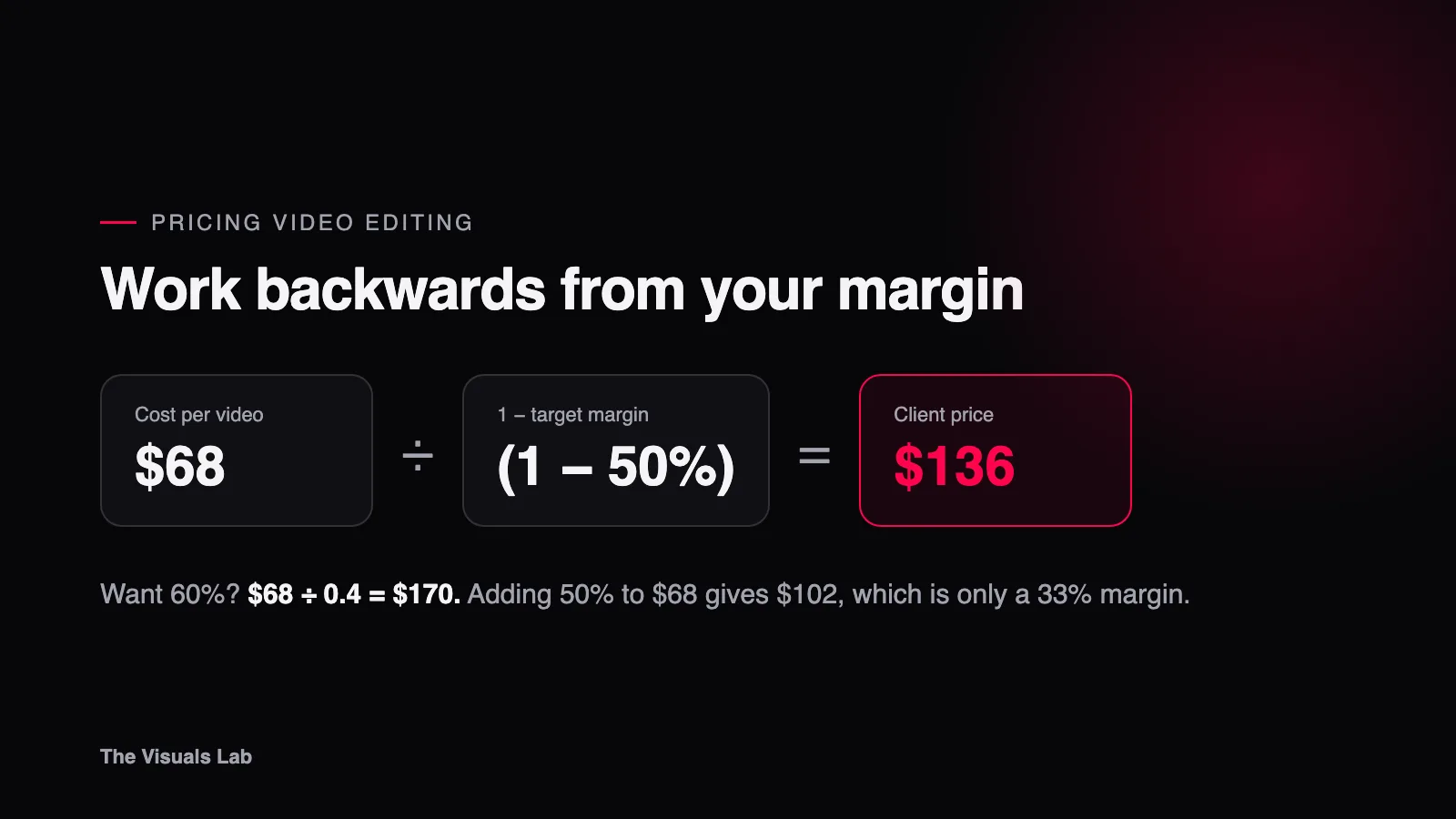
Client price = cost per video ÷ (1 − target margin)
So if a video costs you $68 and you want a 50% margin, you charge $68 ÷ 0.5 = $136. For a 60% margin, you charge $68 ÷ 0.4 = $170. To run these numbers on your own prices and volume, use our free white-label margin calculator.
Don't confuse margin with markup. Adding 50% to a $68 cost gives you $102, which is only a 33% margin. The formula above gives you the margin you actually asked for.
Your cost sets the minimum. The value to the client sets how far above it you can go. A restaurant posting three Reels a week and a national e-commerce brand running paid ads may need similar edits, but the second one gets far more value from each video. Things that justify a higher price:
- Strategy and creative direction, not only editing.
- Speed and reliability: guaranteed turnaround is worth paying for.
- Results the client can see, such as better ad performance or more leads.
- Fewer things for the client to manage: one point of contact for the whole content process.
Worked examples: what you keep at 12, 25 and 40 videos
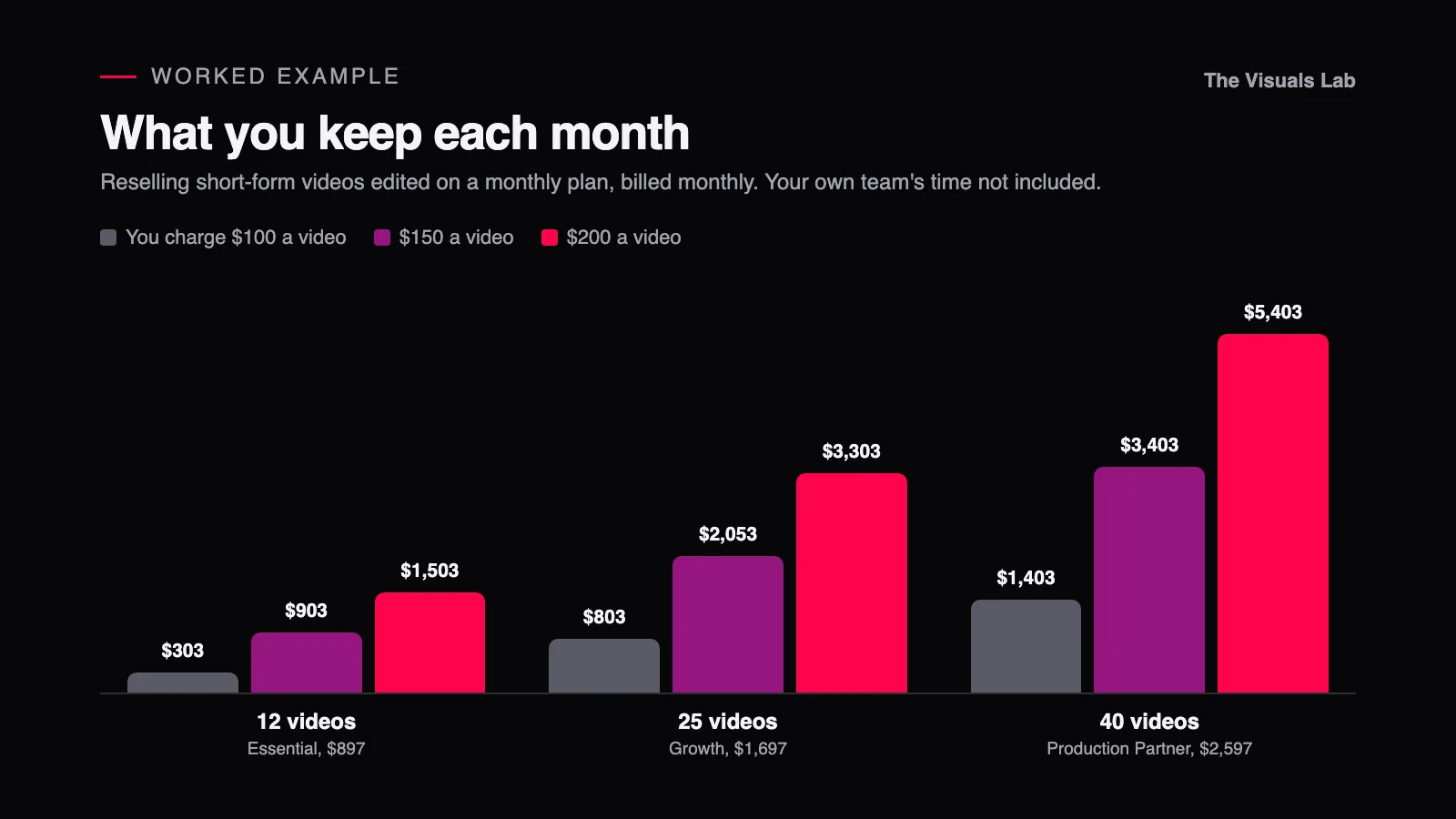
Here is what the numbers look like if you outsource the editing to a monthly plan and resell short-form videos to your clients. These use our own plan prices, billed monthly, and don't include your team's time.
| Videos a month | Your editing cost | At $100 a video | At $150 a video | At $200 a video |
|---|---|---|---|---|
| 12 (Essential) | $897 | $303 kept (25%) | $903 kept (50%) | $1,503 kept (63%) |
| 25 (Growth) | $1,697 | $803 kept (32%) | $2,053 kept (55%) | $3,303 kept (66%) |
| 40 (Production Partner) | $2,597 | $1,403 kept (35%) | $3,403 kept (57%) | $5,403 kept (68%) |
Two things stand out.
Volume lowers your cost per video. The same $150 client price gives you a 50% margin at 12 videos and 57% at 40, because the editing cost per video falls as the plan gets bigger.
Low prices leave little room. At $100 a video and 12 videos a month, you keep $303. Once your own time for briefing and reviewing is taken out, that's close to nothing. If clients in your market won't pay more than about $100 a short-form video, sell bigger packages or include the video in a wider retainer, rather than selling it alone.
Paying quarterly helps too. At 25 videos a month and $150 each, the Growth plan billed quarterly costs about $1,493 a month instead of $1,697, which lifts your margin from 55% to 60%.
Want to try your own numbers? Our free white-label margin calculator does this for any volume and client price, including long-form videos and quarterly billing.
Step 6: Protect your margin when you outsource
Outsourcing editing to a white-label video editing partner makes your cost predictable, but it only protects your margin if you set it up well.
- Price your packages first, then find a partner whose pricing fits them. Not the other way round.
- Keep strategy, scripts and client communication in-house. That's where your agency adds the most value, and it's what clients pay a premium for.
- Pick a partner with fixed monthly pricing and a written turnaround, so a busy month doesn't suddenly cost more.
- Make sure it stays white-label. Your partner should sign an NDA, never contact your clients and deliver files with no credit. Our confidentiality page shows what that should look like.
- Test before you commit. A short paid trial on real footage tells you more than any portfolio.
Common pricing mistakes agencies make
- Pricing by the hour. It punishes efficiency and makes the client's bill unpredictable.
- Unlimited revisions on a cheap package. One difficult client can wipe out the margin on the whole account.
- Giving away scripting and strategy. These take real time and are often worth more than the edit.
- Discounting video to win the rest of the retainer. The video work then runs at a loss every month.
- Forgetting your own time. Briefing, reviewing and client feedback are part of the cost of every video.
- Never raising prices. Review your pricing every six to twelve months, and when a client's volume or scope grows.
Frequently asked questions
How much should an agency charge for video editing?
There is no single right price, because it depends on your cost per video and what your market will pay. Start from your real cost per video, including your team's time, then use the formula cost ÷ (1 − target margin) to set a price that gives you the margin you need.
Should I charge per video or per month?
For most agency clients, a monthly package with a set number of videos works best. It's predictable for both sides and matches how most editing partners charge. Per-video pricing is useful for one-off projects or a client who wants to test you first.
What margin should I aim for on video editing?
That depends on your costs and how much your team does around each video. Use the worked examples above as a guide: with outsourced editing, the same client price gives a higher margin as volume grows. Whatever margin you aim for, make sure it still leaves room for your own time.
How many revisions should be included?
One or two rounds per video is common. Define what counts as a revision (fixing the video against the brief) and what counts as a new request (changing the brief), and quote new requests separately.
Can I resell outsourced video editing under my agency's name?
Yes. That's what white-label video editing is. Make sure your partner signs an NDA, never contacts your clients and delivers files without any credit, so the work stays yours. Read more in what is white-label video editing.
Want to check the numbers on your own footage? Start with a Pilot Week: 5 edits for $297, with your money back if they miss your brief after one revision. Then pick the monthly plan that fits your volume. Book a free call.